

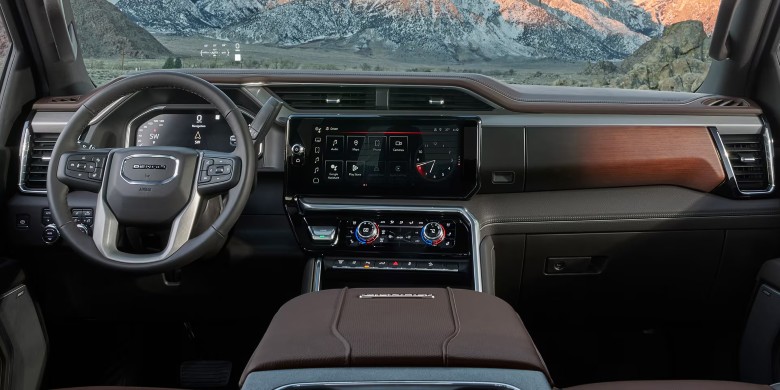
That moment when a warning light suddenly appears on your GMC Sierra dashboard can be unsettling. You're driving along comfortably when—suddenly—a symbol illuminates in orange or red. At Elk Grove Buick GMC, we frequently hear from drivers asking, “What does this dashboard light mean?” The truth is, those dashboard warning lights are your vehicle's way of communicating with you. Understanding what they're telling you can help prevent more serious issues and keep you safe on the road.
Your GMC Sierra’s dashboard provides crucial information about your vehicle's health and safety systems. While some indicators are straightforward, others can seem confusing without proper explanation. When you start your vehicle, you'll see various symbols briefly illuminate as part of a system self-check. This guide will help you understand what these symbols mean and what action to take when they appear during normal driving conditions.
For comprehensive information specific to your vehicle, always refer to your Owner's Manual or visit the official GMC resources:
GMC Warning Lights |
Dashboard Lights & Signals
Critical Red Warning Lights: Stop Immediately
Red warning lights indicate immediate danger or serious problems that require stopping the vehicle as soon as safely possible. Ignoring these can lead to severe vehicle damage or safety hazards.
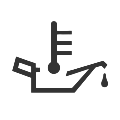
Engine Oil Pressure
This red oil can symbol indicates low oil pressure, which could mean you're running low on oil or the oil pump is malfunctioning. Driving with this warning can cause severe engine damage within minutes. Pull over safely, shut off the engine immediately, and check your oil level. If it's low, add oil; if not, seek professional assistance from our service department.


Engine Coolant Temperature
This light will briefly illuminate when you start your GMC and then turn off. If it stays on or comes on while driving, your vehicle has overheated. Continuing to drive can cause serious engine damage. If you see this light, pull over safely and turn off the engine immediately. Have your vehicle towed to Elk Grove Buick GMC for diagnosis.

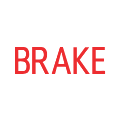
Brake System Warning
This light flashes during startup to confirm it's working. If it remains illuminated while driving, there's a problem with your braking system or low brake fluid. Pull over as soon as safely possible. Your vehicle speed may be limited, and the brake pedal may feel harder. Contact our service team immediately.

Important Yellow/Orange Warning Lights: Get Checked Soon
Yellow or orange lights mean caution—schedule service soon. Ignoring these can lead to more serious problems.
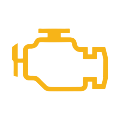
Check Engine Light
Also called Malfunction Indicator Lamp, it illuminates when the engine or propulsion system has an issue. Service as soon as possible. If flashing, it indicates a severe misfire requiring immediate attention.


Charging System Light
If it stays on while driving, there may be an electrical system problem. Have it serviced immediately. Continuing can drain the 12-volt battery. Turn off accessories like radio and climate control if you must drive a short distance.


Tire Pressure (TPMS)
If it remains illuminated, one or more tires is significantly underinflated. If it flashes, the TPMS may need service. Proper inflation is crucial for fuel efficiency, handling, and safety.

Safety System Warning Lights

Airbag Readiness
Flashes during startup; if it stays on, the airbag system needs immediate service. See our service department.

Traction Control (TCS/ESC)
Flashes when system is active. Steady light indicates a fault; schedule service soon.

Anti-Lock Brakes (ABS)
If illuminated, ABS is disabled; conventional brakes work. If both ABS and brake light are on, immediate attention required.
Seat Belt & Safety Reminder Lights

Seat Belt Reminder
Illuminates if any seat belt is unbuckled at start. Ensure all occupants are buckled.

Door Ajar
Indicates a door or liftgate is not fully closed. Check all doors before driving.

Security Light
Flashes when theft-deterrent system is active. If steady and engine won't start, see dealer.

Low Fuel Warning
Refuel as soon as possible. Running on empty can damage the fuel pump.
Driver Assistance Feature Warning Lights

Lane Keep Assist
White = inactive, green = active, orange = lane departure detected.

Forward Collision Alert
Green = vehicle detected ahead. Amber = following too closely.

Auto Emergency Braking
Icon appears if set to “Alert only” or “Off”. We recommend “Alert and Brake”.

Adaptive Cruise Control
White = active but no gap set; green = maintaining set following distance.
 Search New Inventory
 Service & Parts Specials
Value Your Trade
Service & Parts Specials
Value Your Trade
 Quick Credit App
GMC Showroom
View All Vehicles
Quick Credit App
GMC Showroom
View All Vehicles
Frequently Asked Questions – GMC Sierra Dashboard Lights
What should I do if multiple dashboard lights come on at once?
Multiple lights often indicate an electrical or system-wide issue. Safely pull over and schedule service at Elk Grove Buick GMC immediately. It could signal a computer or serious mechanical problem.
Can I drive with the check engine light on?
Solid yellow: you can drive to our service center, but schedule promptly. Flashing red: stop immediately – severe misfire can damage the catalytic converter.
How do I reset service lights after maintenance?
Some GMC models allow reset via dashboard settings. Otherwise, our certified technicians at Elk Grove Buick GMC will reset them properly during your visit.
Are dashboard warning lights universal?
Most symbols are standardized, but GMC has unique alerts. Always consult your Owner's Manual or our dealership for accurate information.
Red vs. yellow – what’s the difference?
Red: immediate danger – stop safely. Yellow/orange: caution – schedule service soon. Ignoring either can lead to expensive repairs.
Why do all lights flash when I start my Sierra?
That’s a normal bulb check. They should turn off after a few seconds. If any remain on, the system detected an issue that needs attention.
Don’t Ignore Your Dashboard Warnings
At Elk Grove Buick GMC, we understand how confusing dashboard lights can be. Whether it’s a check engine light, TPMS, or any other warning, our certified technicians can accurately diagnose and resolve the issue. Visit us at 8450 Laguna Grove Dr., Elk Grove, CA 95757 or call Sales: 916-691-2700.